Skip the forms and step right into the app. You can sign in with a single click as either an Agent or an Admin. If the demo has been idle, give it about a minute to load since its hosted on Render.
Why I built this
I wanted to explore the frontier of AI-integrated systems. When building the app, I wanted to see how far an AI agent could go if it was given the power to actually run a support desk, and actually act on a ticket by replying to customers, reassigning cases, and updating ticket lifecycles, without ever being trusted to do any of that without a human-in-the-loop. The main goal of creating this project was to see how well an AI agent could ground its responses from local domain knowledge base, touching business policies securely.
What it does
- Ticket queue: search and filter tickets, follow each conversation, and set the status, priority, category and assignee.
- AI triage: summarizes a ticket and suggests a category and priority. One click applies the suggestion.
- Reply drafts: writes a reply from the knowledge base and shows which documents it used.
- Knowledge base: admins upload documents, and a search shows which passages the AI would use to answer a question.
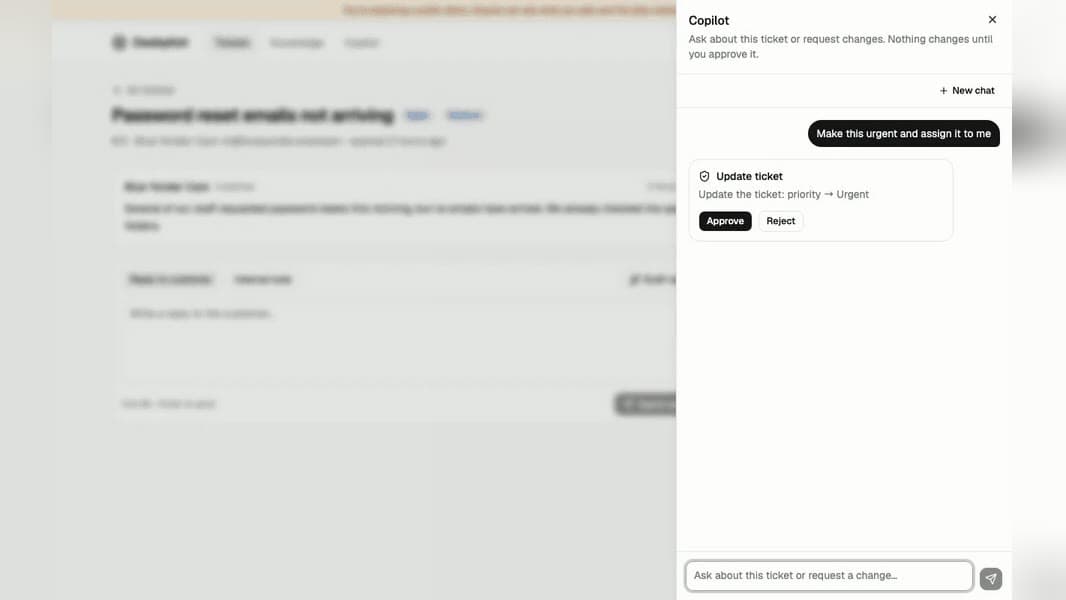
- Copilot: a chat assistant that answers questions and can update, assign or reply to a ticket, but only after you approve each change.
- Works with AI assistants: Claude, ChatGPT and other MCP clients can search the knowledge base and read tickets on the live demo.
See it in action
Below is a full walkthrough, created and narrated using AI.
Built with
- Frontend: React, TypeScript, Tailwind CSS, shadcn/ui, TanStack Query
- Backend: .NET 10, ASP.NET Core (Minimal APIs), EF Core, Identity, Aspire
- AI: OpenAI, Microsoft Agent Framework (MAF), MCP server
- Database: PostgreSQL (pgvector)
- API: OpenAPI, Scalar
- Observability: OpenTelemetry
- Testing: xUnit, Vitest, Playwright
- Deployment: Docker, GitHub Actions, Render, Neon
Notable decisions
- Real approval pause: when the agent wants to perform an action, the system
doesn't just fake a pause in the UI. Write actions are wrapped in an
ApprovalRequiredAIFunction, which halts the agent run and returns aToolApprovalRequestContentinstead of executing anything. The underlying function only runs once an approval decision comes in. - The whole session is persisted: an agent run paused on approval is stored in PostgreSQL rather than held in memory, because a human might not respond for a while, a restart or redeploy shouldn't lose the run. It also leaves an audit trail of what was proposed versus approved.
- Grounding replies in the knowledge base: documents are split into
~1,200-character sections, embedded with OpenAI's
text-embedding-3-small, and indexed in PostgreSQL with pgvector (HNSW). Drafting a reply calls asearch_knowledge_basetool that pulls the closest chunks by cosine distance and grounds the answer in them. - .NET for building agents: most AI agent tooling defaults to Python. Choosing to build this on .NET with Microsoft.Extensions.AI and Agent Framework was intentional. Microsoft is continuously improving its ecosystem for AI-integration, and I wanted to explore that. The agent framework has a lot of potential to make building AI agents easier and more robust.
- Securing prompts: ticket and knowledge base content comes from users, so prompts are written assuming that text can try to steer the agent. A strong evaluation framework is used for running tests, which also spots suspicious hijacking attempts.
Observability and evals
Aspire picks up the agent's OpenTelemetry traces, so I can follow every copilot message from the request down to each model call, tool call and database query.